
昨天的 get_page_info 已經能執行,但 WebMCP 真正困難的地方不是「function 會不會跑」,而是 Agent 能不能在一堆 Tools 裡選對工具、填對參數、理解結果。
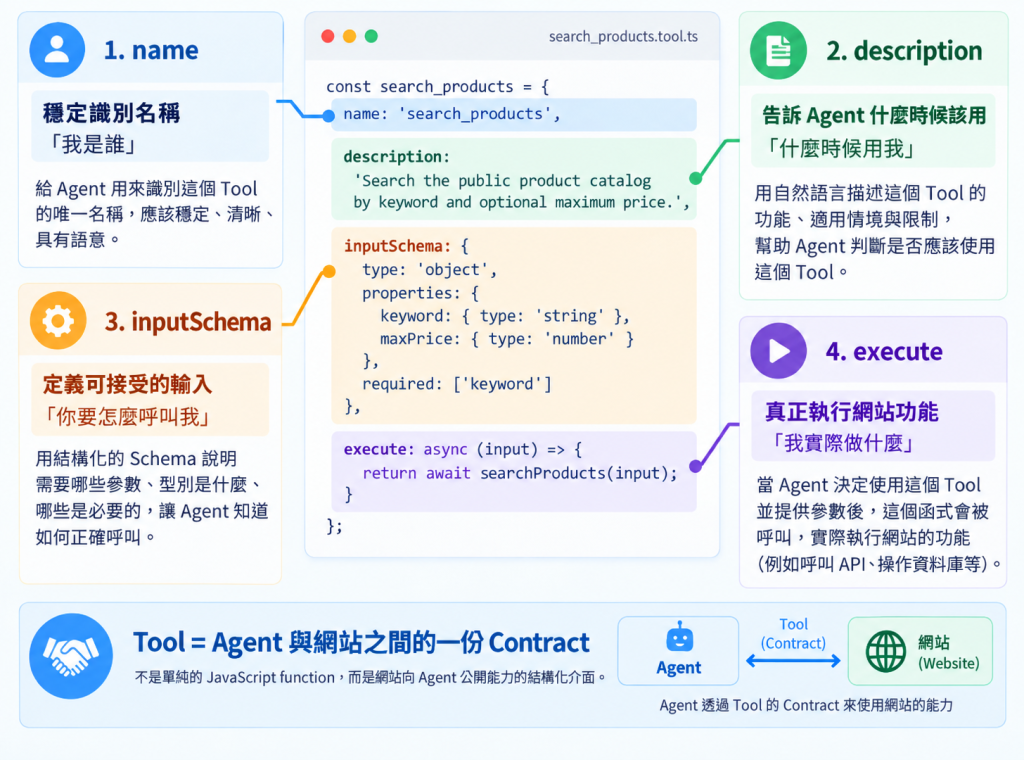
今天把 Tool 當成一份 Contract 來拆:name 是穩定識別、description 是使用時機、inputSchema 是輸入契約、execute 是真正行為。任何一塊模糊,最後都可能變成 Tool Calling 錯誤。
await document.modelContext.registerTool({
  name: 'do_search',
  description: 'Search something.',
  inputSchema: {
    type: 'object',
    properties: {
      q: { type: 'string' }
    }
  },
  execute: async ({ q }) => {
    return JSON.stringify(await search(q));
  }
});
程式沒有問題,但如果同時有:
search_posts
search_products
search_docs
search_orders
Search something. 幾乎沒告訴 Agent 任何有效資訊。
我偏好:
動詞_物件
例如:
search_posts
get_product
add_to_cart
prepare_checkout
不推薦:
button1
handleSearch
apiCall
process
原因很簡單:Tool 名稱會參與模型判斷。名稱本身就應該有語意,而不是暴露你的前端實作。
比較:
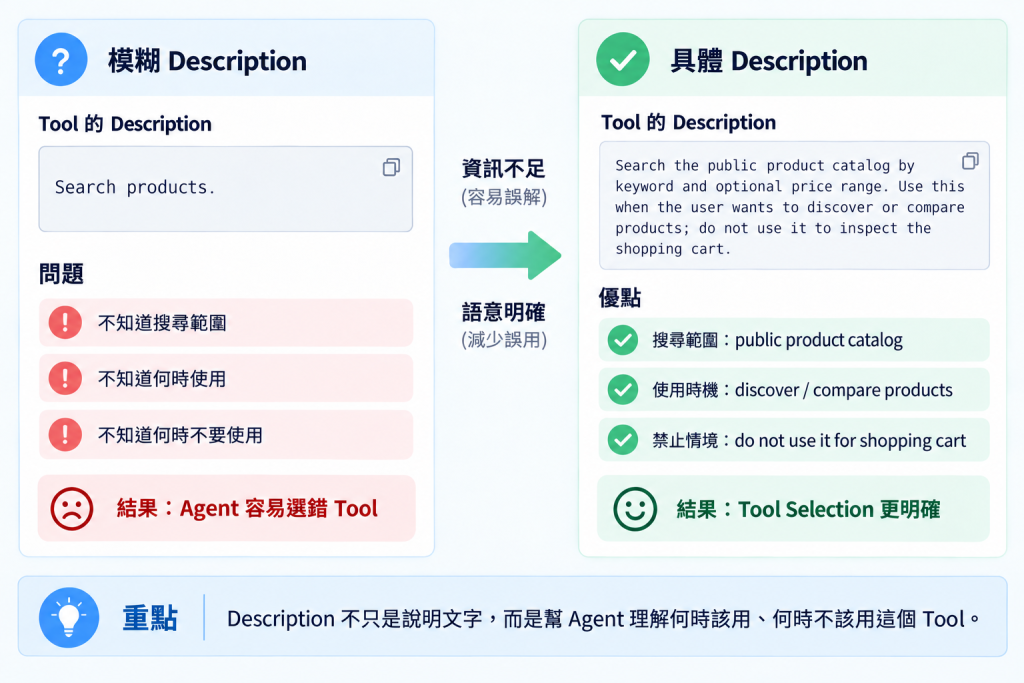
❌ Search products.
和:
✅ Search the public product catalog by keyword and optional price range. Use this when the user wants to discover or compare products; do not use it to inspect the shopping cart.
第二個版本多了三件事:
Description 其實很像「迷你 Prompt」,但不要寫成作文。Chrome 的安全指南目前也建議控制 Tool 說明與輸出的字元預算,避免上下文膨脹。
📸 圖片 1|模糊與具體 Description 的差別
例如商品搜尋:
inputSchema: {
  type: 'object',
  properties: {
    keyword: {
      type: 'string',
      description: 'Product keyword provided by the user.'
    },
    maxPrice: {
      type: 'number',
      minimum: 0,
      description: 'Maximum price. Omit when the user has no budget limit.'
    }
  },
  required: ['keyword']
}
使用者說:
找 1500 元以下的鍵盤
Agent 理想上會得到:
{
  "keyword": "鍵盤",
  "maxPrice": 1500
}
這就比叫 Agent 自己拼 URL、點價格元件穩定得多。
我會把 Tool 寫成 Adapter:
async function searchProducts({ keyword, maxPrice }) {
  // 真正網站邏輯
}

await document.modelContext.registerTool({
  name: 'search_products',
  description: '...',
  inputSchema: { /* ... */ },
  annotations: { readOnlyHint: true },
  execute: async (input) => {
    const result = await searchProducts(input);
    return JSON.stringify(result);
  }
});
不要變成:
execute: async () => {
  // query DOM
  // 拼 API
  // 算價格
  // 寫 localStorage
  // render UI
  // 追蹤 analytics
  // 全部塞這裡
}
這個好處在 WordPress 這類後端框架特別明顯:Tool 只負責 Agent Interface,資料照樣可以來自 PHP REST API。
📸 圖片 2|一個 WebMCP Tool 的四個核心區塊
目前官方 Imperative API 支援:
annotations: {
  readOnlyHint: true,
  untrustedContentHint: false,
  consequentialHint: false
}
readOnlyHint:不改變狀態。untrustedContentHint:輸出可能含 UGC/外部不可信內容。consequentialHint:會造成高風險、重大或不可逆結果。這些不是 Authorization 的替代品,但可以讓 Agent/Browser 更知道該怎麼處理 Tool。
await document.modelContext.registerTool({
  name: 'search_products',
  description: 'Search the public product catalog by keyword and optional maximum price. Use this for product discovery, not cart operations.',
  inputSchema: {
    type: 'object',
    properties: {
      keyword: {
        type: 'string',
        minLength: 1,
        description: 'Product keyword to search for.'
      },
      maxPrice: {
        type: 'number',
        minimum: 0,
        description: 'Maximum product price.'
      }
    },
    required: ['keyword']
  },
  annotations: {
    readOnlyHint: true
  },
  execute: async ({ keyword, maxPrice }) => {
    const items = await searchProducts({ keyword, maxPrice });

    return JSON.stringify({
      count: items.length,
      items: items.map(item => ({
        id: item.id,
        name: item.name,
        price: item.price,
        url: item.url
      }))
    });
  }
});
1. 名稱能不能一眼知道它做什麼?
2. Description 有沒有說清楚何時用/何時不要用?
3. Schema 能不能限制 Agent 不要亂填?
4. Result 有沒有只回任務需要的資訊?
如果四個答案都模糊,Tool 就算「可以執行」,也不代表「適合給 Agent 使用」。
name 和 description 會影響 Tool Selection。inputSchema 是把自然語言約束成可靠參數的核心。execute 應重用既有 Business Logic。


 iThome鐵人賽
 看影片追技術